ProductSLO monitoring
Know how much failure you can still afford.
Set a target per service. Observer turns every check into an error budget, recomputed every five minutes, and tells you when it is spent.
Pick a week
- Budget left
- 5.2%
- Healthy checks, 30d
- 99.905%
- Burn event
- Closed 1d 2h ago
Budget remaining at each evaluation, last 7 days
| Evaluated (UTC) | Budget remaining |
|---|---|
| 2026-10-15 14:30:00 UTC | 58.6% |
| 2026-10-15 15:00:00 UTC | 58.6% |
| 2026-10-15 15:30:00 UTC | 58.5% |
| 2026-10-15 16:00:00 UTC | 58.5% |
| 2026-10-15 16:30:00 UTC | 58.5% |
| 2026-10-15 17:00:00 UTC | 58.5% |
| 2026-10-15 17:30:00 UTC | 58.5% |
| 2026-10-15 18:00:00 UTC | 58.4% |
| 2026-10-15 18:30:00 UTC | 58.4% |
| 2026-10-15 19:00:00 UTC | 58.4% |
| 2026-10-15 19:30:00 UTC | 58.4% |
| 2026-10-15 20:00:00 UTC | 58.4% |
| 2026-10-15 20:30:00 UTC | 58.4% |
| 2026-10-15 21:00:00 UTC | 58.3% |
| 2026-10-15 21:30:00 UTC | 58.3% |
| 2026-10-15 22:00:00 UTC | 58.3% |
| 2026-10-15 22:30:00 UTC | 58.3% |
| 2026-10-15 23:00:00 UTC | 58.3% |
| 2026-10-15 23:30:00 UTC | 58.2% |
| 2026-10-16 00:00:00 UTC | 58.2% |
| 2026-10-16 00:30:00 UTC | 58.2% |
| 2026-10-16 01:00:00 UTC | 58.2% |
| 2026-10-16 01:30:00 UTC | 58.2% |
| 2026-10-16 02:00:00 UTC | 58.1% |
| 2026-10-16 02:30:00 UTC | 58.1% |
| 2026-10-16 03:00:00 UTC | 58.1% |
| 2026-10-16 03:30:00 UTC | 58.1% |
| 2026-10-16 04:00:00 UTC | 58.1% |
| 2026-10-16 04:30:00 UTC | 58.0% |
| 2026-10-16 05:00:00 UTC | 58.0% |
| 2026-10-16 05:30:00 UTC | 58.0% |
| 2026-10-16 06:00:00 UTC | 58.0% |
| 2026-10-16 06:30:00 UTC | 58.0% |
| 2026-10-16 07:00:00 UTC | 58.0% |
| 2026-10-16 07:30:00 UTC | 57.9% |
| 2026-10-16 08:00:00 UTC | 57.9% |
| 2026-10-16 08:30:00 UTC | 57.9% |
| 2026-10-16 09:00:00 UTC | 57.9% |
| 2026-10-16 09:30:00 UTC | 57.9% |
| 2026-10-16 10:00:00 UTC | 57.8% |
| 2026-10-16 10:30:00 UTC | 57.8% |
| 2026-10-16 11:00:00 UTC | 52.2% |
| 2026-10-16 11:30:00 UTC | 38.2% |
| 2026-10-16 12:00:00 UTC | 24.2% |
| 2026-10-16 12:30:00 UTC | 10.2% |
| 2026-10-16 13:00:00 UTC | -3.8% |
| 2026-10-16 13:30:00 UTC | -9.4% |
| 2026-10-16 14:00:00 UTC | -9.4% |
| 2026-10-16 14:30:00 UTC | -9.4% |
| 2026-10-16 15:00:00 UTC | -9.4% |
| 2026-10-16 15:30:00 UTC | -9.4% |
| 2026-10-16 16:00:00 UTC | -9.4% |
| 2026-10-16 16:30:00 UTC | -9.4% |
| 2026-10-16 17:00:00 UTC | -9.5% |
| 2026-10-16 17:30:00 UTC | -9.5% |
| 2026-10-16 18:00:00 UTC | -9.5% |
| 2026-10-16 18:30:00 UTC | -9.5% |
| 2026-10-16 19:00:00 UTC | -9.5% |
| 2026-10-16 19:30:00 UTC | -9.5% |
| 2026-10-16 20:00:00 UTC | -9.5% |
| 2026-10-16 20:30:00 UTC | -9.5% |
| 2026-10-16 21:00:00 UTC | -9.5% |
| 2026-10-16 21:30:00 UTC | -9.5% |
| 2026-10-16 22:00:00 UTC | -9.5% |
| 2026-10-16 22:30:00 UTC | -9.5% |
| 2026-10-16 23:00:00 UTC | -9.5% |
| 2026-10-16 23:30:00 UTC | -9.6% |
| 2026-10-17 00:00:00 UTC | -9.6% |
| 2026-10-17 00:30:00 UTC | -9.6% |
| 2026-10-17 01:00:00 UTC | -9.6% |
| 2026-10-17 01:30:00 UTC | -9.6% |
| 2026-10-17 02:00:00 UTC | -9.6% |
| 2026-10-17 02:30:00 UTC | -9.6% |
| 2026-10-17 03:00:00 UTC | -9.6% |
| 2026-10-17 03:30:00 UTC | -9.6% |
| 2026-10-17 04:00:00 UTC | -9.6% |
| 2026-10-17 04:30:00 UTC | -9.6% |
| 2026-10-17 05:00:00 UTC | -9.6% |
| 2026-10-17 05:30:00 UTC | -9.6% |
| 2026-10-17 06:00:00 UTC | -9.6% |
| 2026-10-17 06:30:00 UTC | -9.7% |
| 2026-10-17 07:00:00 UTC | -9.7% |
| 2026-10-17 07:30:00 UTC | -9.7% |
| 2026-10-17 08:00:00 UTC | -9.7% |
| 2026-10-17 08:30:00 UTC | -9.7% |
| 2026-10-17 09:00:00 UTC | -9.7% |
| 2026-10-17 09:30:00 UTC | -9.7% |
| 2026-10-17 10:00:00 UTC | -9.7% |
| 2026-10-17 10:30:00 UTC | -9.7% |
| 2026-10-17 11:00:00 UTC | -9.7% |
| 2026-10-17 11:30:00 UTC | -9.7% |
| 2026-10-17 12:00:00 UTC | -9.7% |
| 2026-10-17 12:30:00 UTC | -9.7% |
| 2026-10-17 13:00:00 UTC | -9.8% |
| 2026-10-17 13:30:00 UTC | -9.8% |
| 2026-10-17 14:00:00 UTC | -9.8% |
| 2026-10-17 14:30:00 UTC | -9.8% |
| 2026-10-17 15:00:00 UTC | -9.8% |
| 2026-10-17 15:30:00 UTC | -9.8% |
| 2026-10-17 16:00:00 UTC | -9.8% |
| 2026-10-17 16:30:00 UTC | -9.8% |
| 2026-10-17 17:00:00 UTC | -9.8% |
| 2026-10-17 17:30:00 UTC | -9.8% |
| 2026-10-17 18:00:00 UTC | -9.8% |
| 2026-10-17 18:30:00 UTC | -9.8% |
| 2026-10-17 19:00:00 UTC | -9.8% |
| 2026-10-17 19:30:00 UTC | -9.8% |
| 2026-10-17 20:00:00 UTC | -9.8% |
| 2026-10-17 20:30:00 UTC | -9.9% |
| 2026-10-17 21:00:00 UTC | -9.9% |
| 2026-10-17 21:30:00 UTC | -9.9% |
| 2026-10-17 22:00:00 UTC | -9.9% |
| 2026-10-17 22:30:00 UTC | -9.9% |
| 2026-10-17 23:00:00 UTC | -9.9% |
| 2026-10-17 23:30:00 UTC | -9.9% |
| 2026-10-18 00:00:00 UTC | -9.9% |
| 2026-10-18 00:30:00 UTC | -9.9% |
| 2026-10-18 01:00:00 UTC | -9.9% |
| 2026-10-18 01:30:00 UTC | -9.9% |
| 2026-10-18 02:00:00 UTC | -9.9% |
| 2026-10-18 02:30:00 UTC | -9.9% |
| 2026-10-18 03:00:00 UTC | -9.9% |
| 2026-10-18 03:30:00 UTC | -10.0% |
| 2026-10-18 04:00:00 UTC | -10.0% |
| 2026-10-18 04:30:00 UTC | -10.0% |
| 2026-10-18 05:00:00 UTC | -10.0% |
| 2026-10-18 05:30:00 UTC | -10.0% |
| 2026-10-18 06:00:00 UTC | -10.0% |
| 2026-10-18 06:30:00 UTC | -10.0% |
| 2026-10-18 07:00:00 UTC | -10.0% |
| 2026-10-18 07:30:00 UTC | -10.0% |
| 2026-10-18 08:00:00 UTC | -10.0% |
| 2026-10-18 08:30:00 UTC | -10.0% |
| 2026-10-18 09:00:00 UTC | -10.0% |
| 2026-10-18 09:30:00 UTC | -10.1% |
| 2026-10-18 10:00:00 UTC | -10.1% |
| 2026-10-18 10:30:00 UTC | -10.1% |
| 2026-10-18 11:00:00 UTC | -10.1% |
| 2026-10-18 11:30:00 UTC | -10.1% |
| 2026-10-18 12:00:00 UTC | -10.1% |
| 2026-10-18 12:30:00 UTC | -9.0% |
| 2026-10-18 13:00:00 UTC | -7.8% |
| 2026-10-18 13:30:00 UTC | -6.7% |
| 2026-10-18 14:00:00 UTC | -5.5% |
| 2026-10-18 14:30:00 UTC | -4.4% |
| 2026-10-18 15:00:00 UTC | -3.3% |
| 2026-10-18 15:30:00 UTC | -2.1% |
| 2026-10-18 16:00:00 UTC | -1.0% |
| 2026-10-18 16:30:00 UTC | 0.2% |
| 2026-10-18 17:00:00 UTC | 1.3% |
| 2026-10-18 17:30:00 UTC | 2.5% |
| 2026-10-18 18:00:00 UTC | 3.6% |
| 2026-10-18 18:30:00 UTC | 3.6% |
| 2026-10-18 19:00:00 UTC | 3.7% |
| 2026-10-18 19:30:00 UTC | 3.7% |
| 2026-10-18 20:00:00 UTC | 3.7% |
| 2026-10-18 20:30:00 UTC | 3.8% |
| 2026-10-18 21:00:00 UTC | 3.8% |
| 2026-10-18 21:30:00 UTC | 3.8% |
| 2026-10-18 22:00:00 UTC | 3.9% |
| 2026-10-18 22:30:00 UTC | 3.9% |
| 2026-10-18 23:00:00 UTC | 3.9% |
| 2026-10-18 23:30:00 UTC | 4.0% |
| 2026-10-19 00:00:00 UTC | 4.0% |
| 2026-10-19 00:30:00 UTC | 4.0% |
| 2026-10-19 01:00:00 UTC | 4.1% |
| 2026-10-19 01:30:00 UTC | 4.1% |
| 2026-10-19 02:00:00 UTC | 4.1% |
| 2026-10-19 02:30:00 UTC | 4.2% |
| 2026-10-19 03:00:00 UTC | 4.2% |
| 2026-10-19 03:30:00 UTC | 4.2% |
| 2026-10-19 04:00:00 UTC | 4.3% |
| 2026-10-19 04:30:00 UTC | 4.3% |
| 2026-10-19 05:00:00 UTC | 4.3% |
| 2026-10-19 05:30:00 UTC | 4.4% |
| 2026-10-19 06:00:00 UTC | 4.4% |
| 2026-10-19 06:30:00 UTC | 4.4% |
| 2026-10-19 07:00:00 UTC | 4.5% |
| 2026-10-19 07:30:00 UTC | 4.5% |
| 2026-10-19 08:00:00 UTC | 4.5% |
| 2026-10-19 08:30:00 UTC | 4.6% |
| 2026-10-19 09:00:00 UTC | 4.6% |
| 2026-10-19 09:30:00 UTC | 4.6% |
| 2026-10-19 10:00:00 UTC | 4.7% |
| 2026-10-19 10:30:00 UTC | 4.7% |
| 2026-10-19 11:00:00 UTC | 4.7% |
| 2026-10-19 11:30:00 UTC | 4.8% |
| 2026-10-19 12:00:00 UTC | 4.8% |
| 2026-10-19 12:30:00 UTC | 4.8% |
| 2026-10-19 13:00:00 UTC | 4.9% |
| 2026-10-19 13:30:00 UTC | 4.9% |
| 2026-10-19 14:00:00 UTC | 4.9% |
| 2026-10-19 14:30:00 UTC | 5.0% |
| 2026-10-19 15:00:00 UTC | 5.0% |
| 2026-10-19 15:30:00 UTC | 5.0% |
| 2026-10-19 16:00:00 UTC | 5.1% |
| 2026-10-19 16:30:00 UTC | 5.1% |
| 2026-10-19 17:00:00 UTC | 5.1% |
| 2026-10-19 17:30:00 UTC | 5.2% |
| 2026-10-19 18:00:00 UTC | 5.2% |
Burn events, last 30 days
| Started (UTC) | Ended (UTC) | Duration | Budget used |
|---|---|---|---|
| 2026-10-16 13:00:00 UTC | 2026-10-18 16:30:00 UTC | 51h 30m | 0.97% |
Closed OpenHover a segment for its duration and budget used.
Budget and SLA
Warned early. Measured fairly.
The same checks feed two numbers on purpose. The error budget counts anything short of healthy, so slow service burns it before a customer can claim a breach. SLA attainment reads like a contract: degraded counts as up. Planned maintenance is left out of both, unless you choose to count it against the budget.
This month, add
Maintenance on the budget
Sample data: one check a minute for 30 days, 43,200 checks, with 8 failed checks to start. Target 99.9%.
Error budget
The SLO page, burn alerts, the public SLO strip
- Healthy
- 43,162
- Degraded, counted against
- 30
- Down, counted against
- 8
- Paused, planned maintenance
- 0
(99.912% - 99.9%) / 0.1%
12.0%
Budget left, no burn event
SLA attainment
SLA reports, statements, the Reliability Center, the executive dashboard
- Up, degraded included
- 43,192
- Down
- 8
- Removed, scheduled maintenance
- 0
43,192 / 43,200
99.981%
Met: not below 99.9%
On the line
Exactly on target is met.
Attainment is compared at full precision and shown truncated, never rounded up, so 99.8996% reads 99.899% and a miss never displays as met.
Planned maintenance
Agreed downtime pauses the budget.
Checks inside published, scheduled maintenance on the service leave the budget calculation, so they never open a burn event. Set an SLO to count them against the budget instead.
Unobserved time
You decide what silence means.
Count checks that never arrived as down, which is the default, as up, or leave them out and disclose the coverage. Both numbers follow the same rule.
Exclusions
Adjudicated, on the record.
Remove a period from attainment with a mandatory reason. Every change is audit-logged, and statements list each one.
In the console
Every SLO answers one question: how long until we breach?
The SLO page shows the budget left, how fast it is going and when a past breach stops counting.
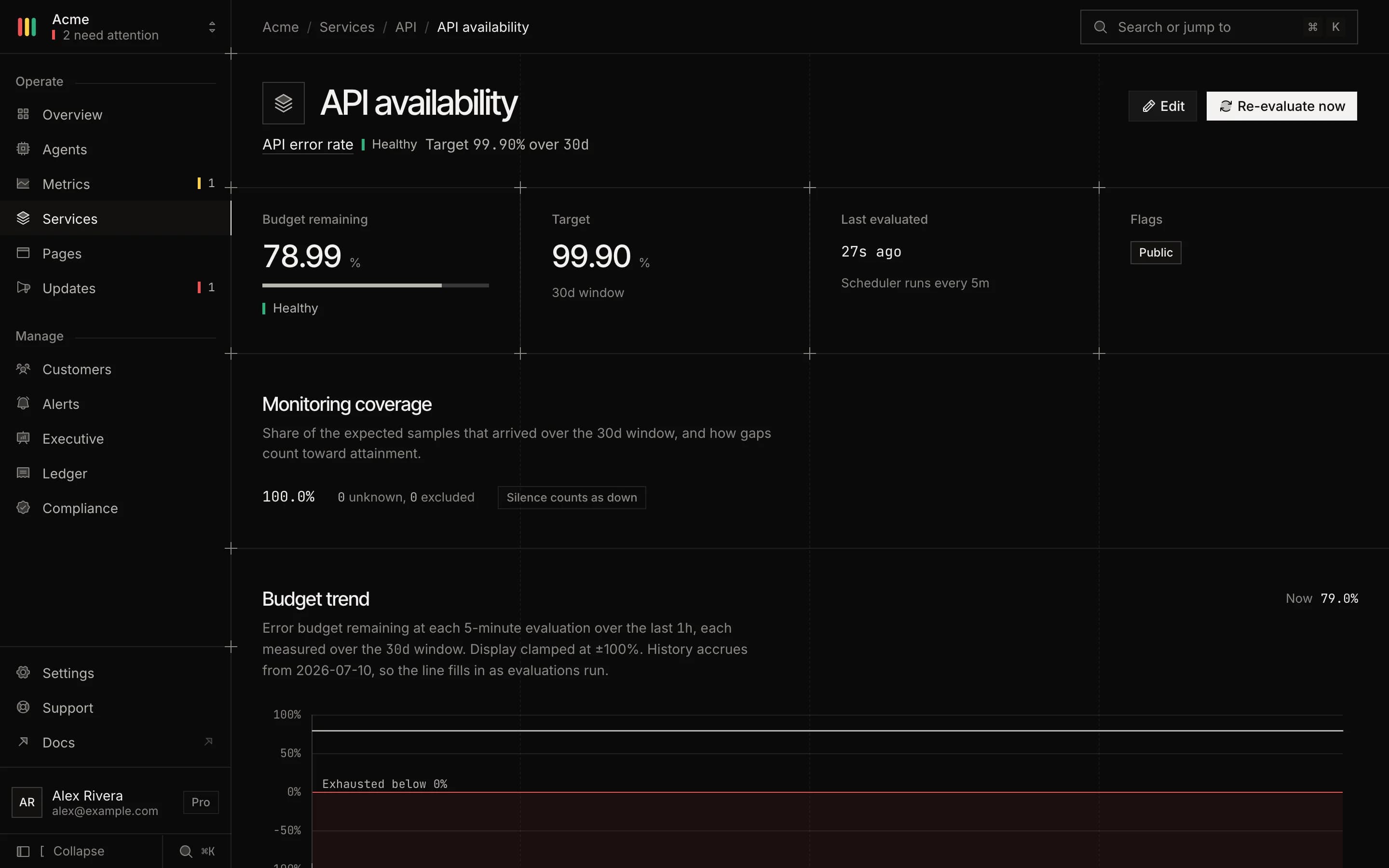
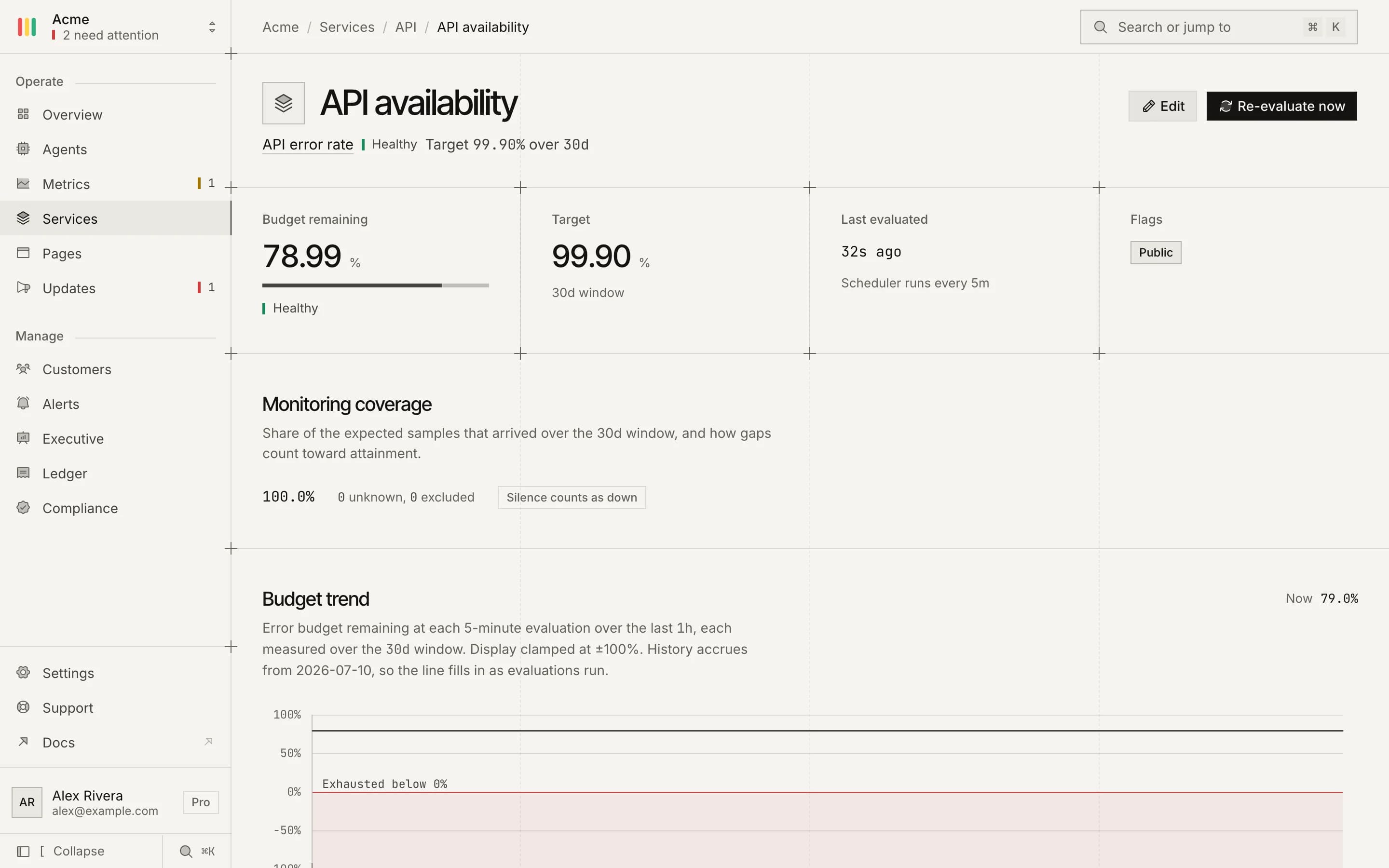
An SLO in the console: budget left, target, monitoring coverage and the budget trend.
Budget trend
A week of evaluations.
Every five-minute evaluation, charted, with the line turning red below zero.
Forecast
Hours to exhaustion, and the way back.
At the current burn, the page estimates when the budget runs out. After a breach, it shows when the breach ages out of the window.
Coverage
How much of the window was observed.
The share of expected checks that arrived, and how the gaps were counted.
Burn events
Each one, with what it cost.
When it started, when it ended and how far below zero the budget went.
Alerts and reports
Hear about it before the customer does.
Burn alerts
One when the budget is spent, one when it is back.
Sent to any alert channel: Slack, PagerDuty, email and the rest. A new SLO collects 24 hours of checks before it reports a budget, so a fresh target cannot page anyone on noise.
Per customer
Each contract, its own budget.
ProOverride the target for a customer. Their budget is computed from the same checks against their number.
Public strip
Show the budget on the status page.
ProPick the SLOs to publish. Each row shows its target, its window and the budget left.
Weekly report
Attainment in the inbox.
Each SLO's attainment and budget, emailed on the day and hour you choose.
Evidence
SLA reports and compliance packs.
Pro, BusinessPer-customer SLA reports from Pro. Compliance evidence packs from Business.
Plans
SLOs from Starter.
SLOs per plan
Counted across every service in the organisation.
Free
0SLOsStarter
0SLOsPro and up
Unlimited